

Conditional (If/Else)
The Conditional action allows your macro to make decisions. It evaluates specific rules or conditions and branches the execution path depending on whether the test passes or fails. This is used to check the state of your .
Action Tabs
- Condition: This is where you define the test that the action will evaluate.
- True: If the condition passes, everything in this tab runs.
- False: If it fails, this tab runs instead.
Simple Rules & Rule Groups
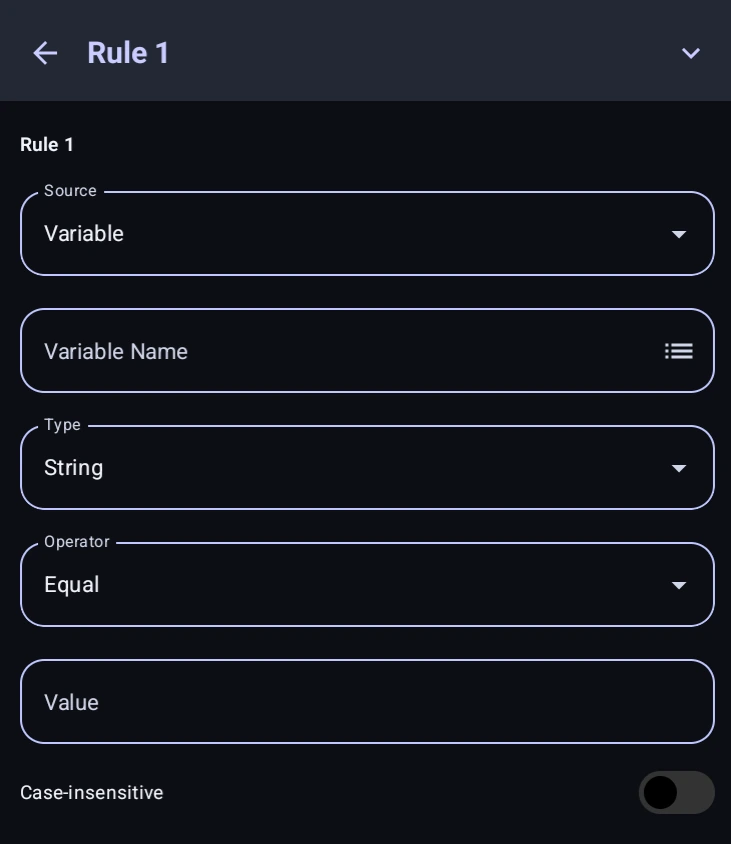
In Simple mode, you build conditions using rules. A rule compares a variable against a specific value. You can add new rules or groups using the  button, and combine them using AND / OR logic:
- AND: All rules connected with AND must be true for the condition to pass.
- OR: Only one of the rules connected with OR needs to be true for the condition to pass.
To handle more complex logic, you can add Rule Groups. A group acts like parentheses in a math equation. For example, you can create a logic flow that says: Rule A MUST be true, AND (Rule B OR Rule C) must be true.
Rule Configuration
A rule starts by choosing what it is checking. That source is one of four things:
- Variable, any in the macro.
- Setting Builder. A value the user picked before the run started, described below. A setting that offers a fixed list of choices only offers
EqualsandNot Equals. - Function Return, what a handed back. Greyed out until the macro has at least one function.
- Image Detection, whether one of the detections in the surrounding succeeded or failed. Only available inside a Multi Detection.
Then you define the comparison itself:
- Target Variable: The you want to check. You can tap the
 button to see a list of all variables you currently have declared.
 - Type: How both sides are read before comparing:
String,Number,BooleanorReference. As String the comparison is alphabetical, so"10"is less than"9"; use Number for counters, timers and results. Reference treats the value as another variable's name and compares what it holds. - Operator:
Equals,Not Equals,Greater,Less,Greater or EqualorLess or Equal. To check whether text contains other text, use a action in Contains mode, or Advanced Mode below withStr.contains(a, b). - Value: What you are comparing the target against. This can be a static value or another variable reference by using
%%(like%otherVar%). - Case-insensitive: If enabled, text comparisons will ignore uppercase and lowercase differences. For example, if your variable contains
"Hello", checking if it equals"hello"will pass if this is turned on, but fail if it is turned off.
Settings Tab Integration
Conditionals pair well with the . Because the Setting Builder saves user choices directly into variables, you can use Simple Rules to check what the user selected (like checking if difficulty Equals hard) and branch your macro accordingly.
Advanced Mode
If your decision requires logic that is too complex for visual rule groups, switch to Advanced Mode. This lets you write the condition directly using raw GScript.
The condition is whatever the last expression in your snippet evaluates to, exactly like a Code action. So all of these work, semicolons and all:
// A single expression
Screen.exists("start_button")

// ...the same thing with a semicolon
Screen.exists("start_button");

// Several statements: the last expression is the answer
let tries = parseInt(getVar("tries"));
tries < 5 && Screen.exists("start_button");

// An explicit return also works
return parseInt(getVar("tries")) < 5;
Every setting arrives as a string, and any non-empty string counts as true, including "false". Compare explicitly: getVar("enabled") == "true".
If the snippet ends on something with no value, such as a loop or a variable declaration, the condition is false. Put the expression you are testing on the last line.
Code Equivalent
// Example of "Rule A AND (Rule B OR Rule C)"
if (getVar("counter") >= 5 && (getVar("mode") == "fast" || getVar("override") == true)) {
    // True Actions
} else {
    // False Actions
}