

Functions tab
The Functions tab is used to create reusable blocks of actions. You build them once, give them a name, and then run them later by using the action instead of copying the same sequence again and again.
Each function has a name and three editor tabs: Actions, , and .
Actions: This is the list of actions inside the function. It can contain the same actions you use in the main Actions tab.
Parameters: These are optional input values that let the same function run with different values. Learn more about .
Return: This is the value the function gives back after it finishes. Learn more about .
When the macro reaches a action, it opens the selected function, runs its actions, evaluates its return value (if it has one), and then continues with the next action after the call.
Most functions need no parameters or return value.
What belongs in a function
A function should do one clear job, such as claiming daily rewards, closing popups, or preparing a battle.
Parameters
Use parameters when the same function should run with different input values.
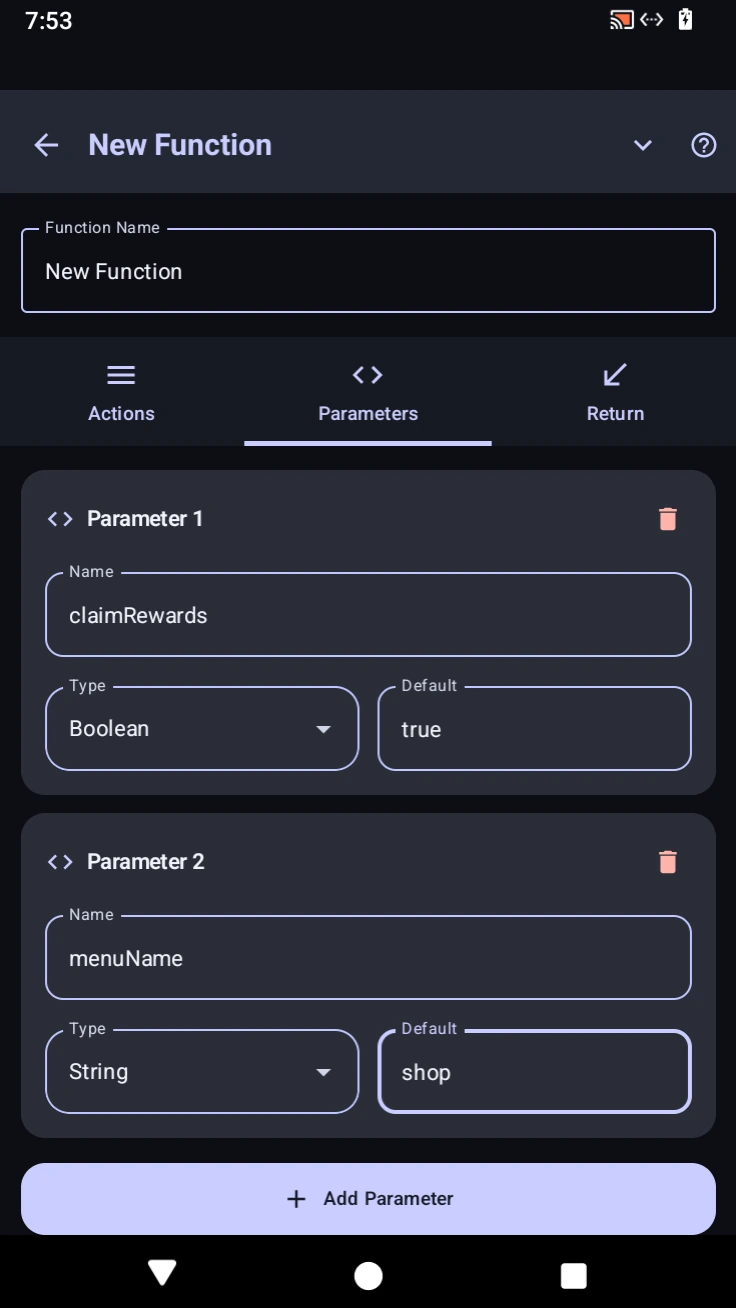
Each parameter has three fields: Name, Type, and Default.
Name: This is the variable name used inside the function. Pick a short name that describes what the function expects, such as menuName, claimRewards, or targetX. Learn more about variables in .
Type: This controls what kind of value the parameter is meant to receive. For example, a Boolean parameter is for true or false, while a String parameter is for text.
Default: This value is used automatically if the action leaves that parameter empty.
In the screenshot, claimRewards is a Boolean with a default value of true, and menuName is a String with a default value of shop. If the caller leaves either one empty, that default is used automatically.
Return
The Return tab decides what value the function gives back after all of its actions finish.
You can return text, numbers, booleans, variable values, or the result of an expression. That returned value can then be used by the action, saved into a variable, or read from lastFunctionReturn.
For example, you could return "done", true, getVar("count") * 2, or %menuName%.
Code equivalent
function prepareBattle(menuName = "shop", claimRewards = true) {
  console.log("Opening menu: " + menuName);

  if (claimRewards) {
    console.log("Claiming rewards first");
  }

  return "Ready from " + menuName;
}

let result = prepareBattle("inventory", true);
console.log("Function returned: " + result);
In this example, menuName and claimRewards are parameters, and return "Ready from " + menuName; is the return value.