

Variables tab
The Variables tab is where you create variables for your macro. A variable is a named value that your macro can read, change, and reuse while it runs.
A variable can hold a number, text, true/false, or a result from another part of the macro.
Each variable has a Name, , and Initial Value. Turn on Keep between loops to carry the value into the next loop of the same run, for example to count loops.
How variables work
You can use a variable in any text field by wrapping its name in %.
For example, a variable time with the value 5000 can go into the timeout field as %time% for a 5000 ms timeout.
If you are writing GScript, you read and write variables with getVar("name") and setVar("name", value) instead of the %name% format.
One variable can hold more than a single value: when a detection saves its result through its Save Result To Variable field, you read the individual parts with a dot, such as %name.x% for the matched position or %name.found% for whether it matched. Those are covered under .
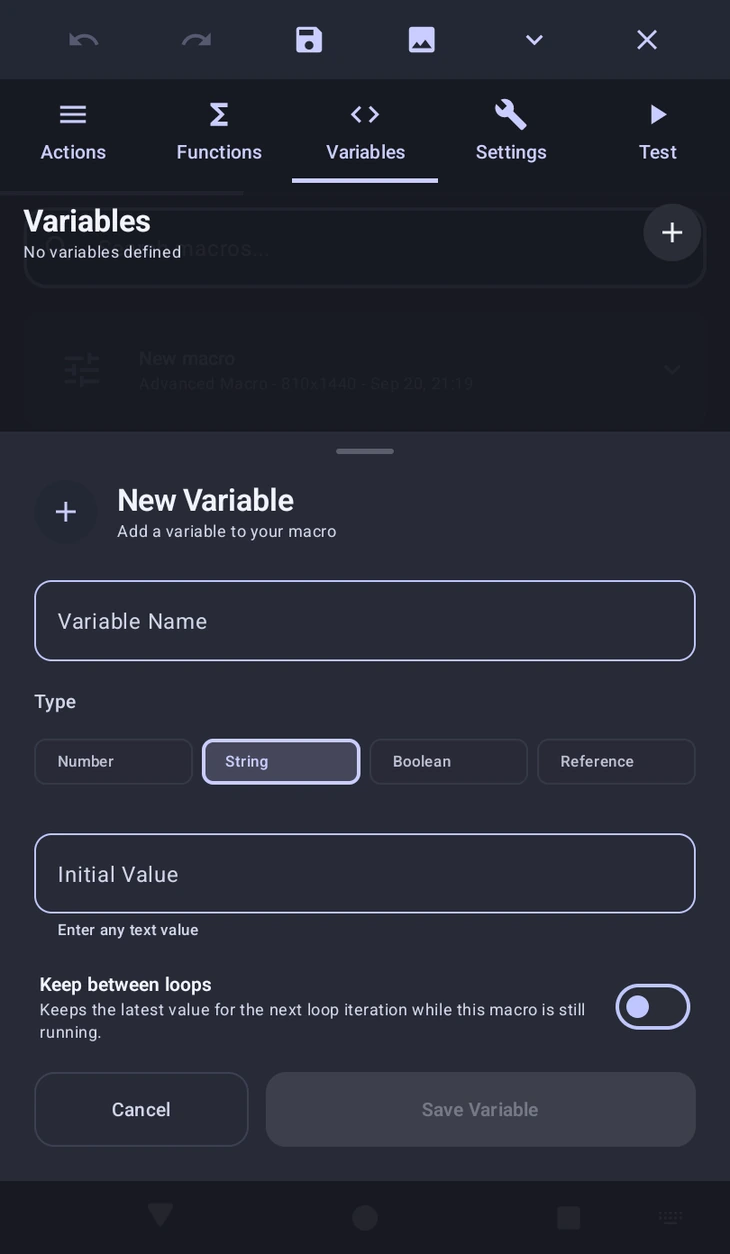
Variable types
String: Stores text. Use this for things like names, labels, messages, or text captured from .Number: Stores numeric values. Use this for timeouts, wait durations, coordinates, counters, or loop values.Boolean: Storestrueorfalse. Use this when a variable is meant to act like an on/off flag in conditionals or functions.Reference: Points to another variable by name. In the Variables tab this is entered as something like@time, and it is useful when one variable should mirror another one.
Where to use them
Use variables when one value controls several actions, or to reuse the coordinates or text saved by , , or .
The writes the user's choices into variables before the macro starts.
If you want to change a variable during the macro, continue to .
Code equivalent
Use let when you only need a normal GScript variable inside your code block.
let time = 5000;
let rewardText = "Daily reward claimed";
Use setVar() when you want to write to a MacroForge variable that other actions, %variable% placeholders, or later code can read.
setVar("shouldHeal", true);
setVar("copiedTime", getVar("time"));